







Once the first Fantasy Premier League (FPL) deadline passes, managers can begin to make transfers. Each will receive one free purchase per Gameweek, although up to five can be collected for a future splurge.
Until Gameweek 1 gets underway, an unlimited amount of tweaking can be made, as we seek perfection with our initial 15-man squads.
How many free transfers do managers get?
After each FPL deadline has passed, managers will receive one new free transfer for the upcoming Gameweek.
This means a player can be sold for anyone else in his same position (a fellow goalkeeper, defender, midfielder or forward), as long as it’s within budget.
As well as that, there can’t be more than three players per Premier League club.
Can they be rolled over?
Thankfully, managers can collect up to five free transfers at once.
You can decide not to use the latest one, and ‘rolling a transfer’ means it gets added to the next Gameweek’s allowance, meaning there’ll then be two free moves to make.
This can continue being done until a maximum of five free transfers is reached. Also, using a Wildcard or Free Hit chip will not lose these collected transfers; you’ll simply get them afterwards, on the other side.
How to make transfers
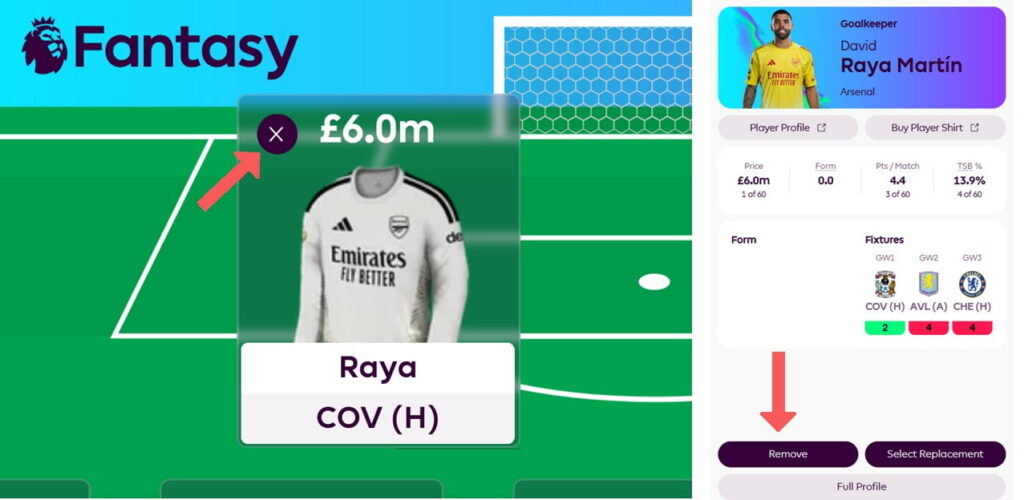
Find the ‘Transfers’ tab and locate whoever you’d like to sell. Either select the small cross in their corner or click the name so that ‘Remove’ comes up.
The player disappears, allowing you to search for his replacement using typing and drop-down menu filters. Click the new name so that ‘Add Player’ can be chosen.
Remember to confirm the decision via ‘Make Transfers’, underneath the pitch.
What is a points ‘hit’?
You’re able to make further transfers outside of the free ones, but each extra one will incur a four-point deduction for the following Gameweek.
So, for example, if you want to make two transfers but only have one freebie, it will cost four points. If you’ve collected two of them, a third gets punished, while a fourth takes the subtraction up to eight points.
Once confirmed, player transfers cannot be reversed. But there are two ways to erase points ‘hits’ before the Gameweek deadline – by turning it into a Wildcard or Free Hit chip usage. As mentioned, activating these won’t affect any accumulated free transfers.
Are points hits a good idea?
It is generally best to avoid a ‘hit’, where possible, as losing points can drop your world ranking thousands of places. Sometimes the hit is worth making, though. Each case needs to be weighed up on its own merit.
This is where Fantasy Football Scout articles and podcasts can help you get ahead of the game.
