







A long time ago, Fantasy Premier League (FPL) introduced some chips to make the game more interesting and strategic, with the Triple Captain now being one of FPL’s funnest parts.
Every manager gets two of these per season.
What is an FPL Triple Captain?
Usually, choosing a weekly captain means that the player’s score will get doubled. However, Triple Captain gives managers two opportunities to multiply it by three – one to be used before Gameweek 19’s deadline, and another at some point afterwards.
For example, captaining a 10-point Erling Haaland return would bring in 20 points. With Triple Captain, it then becomes 30.
If that individual doesn’t play, the Triple Captain points will be passed to your vice-captain. If your vice-captain also doesn’t play, then the chip has been wasted.
How to activate a Triple Captain
Via a computer, select the ‘Pick Team’ tab. Above the starting XI and substitutes bench is a ‘Play’ button that needs clicking and confirming.
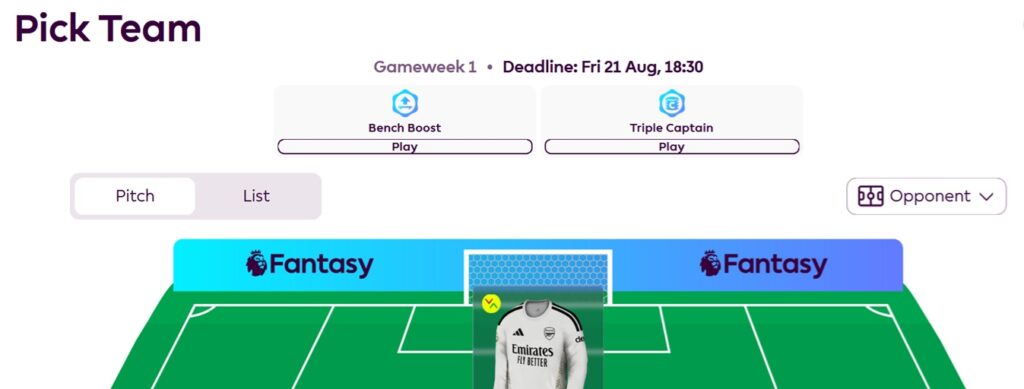
Hit ‘Save Your Team’ and it’ll turn the captaincy logo next to your chosen player’s name from black to white. Meanwhile, using the official FPL app, this is similarly visible.
The Triple Captain chip can be cancelled at any time before the deadline.
The best times to Triple Captain
Chips can be used in a variety of situations; that’s the beauty of them. Perhaps it’s to attack a Double Gameweek, giving the player two matches to treble his points tally.
Then again, maybe you have supreme confidence in that person’s upcoming fixture.
In one match, we’ve seen Mohamed Salah bag a phenomenal 29 points in 2017/18 (four goals, one assist) and Frank Lampard twice bring in a 28-point haul. Remember when Sergio Aguero scored five times against Newcastle United (26 points) or when midfielder Michail Antonio netted four times at Norwich City (26 points)?
Whilst usual advice would be to use Triple Captain on a Double Gameweek player, sometimes the gut feeling puts the special armband elsewhere.
